

Before you begin
The reporter posts only for runs that carry commit and branch details:- With the dispatch action, runs already include them.
- With the API, send the
buildobject in the trigger request.
Install
- Open Settings → Reporters.
- Click Install on the GitHub card.
- Choose the repositories your runs are triggered from: the repository with the dispatch action, or
the one named in
build.repo.
What it posts
Pull request comments
Empirical keeps one comment per pull request and environment, and edits it after every run. The comment shows the latest run with its results, up to four failed tests, any snoozed tests, and the previous 10 runs on the branch.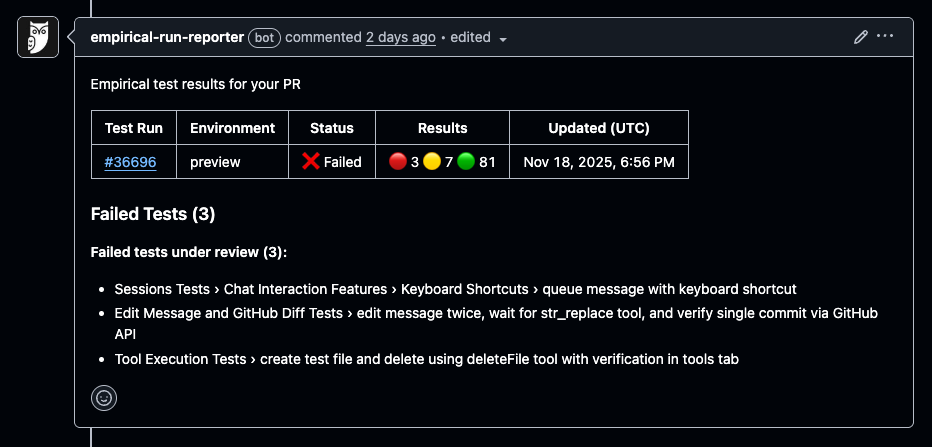
Status checks
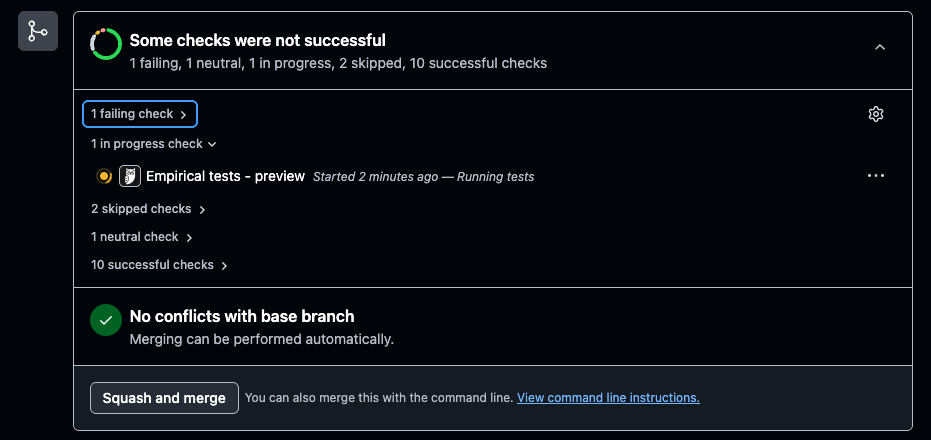
Each run is a check namedEmpirical tests - <environment> on the commit it tested. The check updates while the run is
in progress. Its result ignores snoozed failures, so you can make it a required check.
Linked test changes
For runs triggered by a pull request, Empirical also posts a check namedEmpirical linked test changes. It fails until the pull request’s test changes are merged. See
Linked test changes.